在职业生涯的早期,我曾陷入一种「功能主义」的执念:认为设计的终极价值在于视觉的精妙——把每一像素的图表画得极致精准,或是在逻辑上追求最短路径的交易链路。那时候,我视效率为唯一的真理。
然而,在深耕于各类大型数据分析系统、以及那些对安全性与高容错有着严苛要求的复杂项目后,我的认知发生了彻底的重构。我逐渐意识到:纯粹的逻辑优化如果脱离了真实的人性,往往会走向设计的反面。在一个高压的操作环境下,最短的链路可能是最危险的;在一个信息过载的决策场景中,最精密的图表可能是最令人困惑的。
我深刻体会到:如果无法洞察屏幕对面那双眼睛背后的焦虑、渴望与认知局限,那么所有的设计推演、美学表达乃至交互创新,本质上都只是一场自我感动的「自嗨」。设计师的职责,不是在真空中构建完美的模型,而是在复杂的人机系统中,为那个真实存在、带有情绪且精力有限的「人」,寻找最精准的落脚点。
因此,这篇文章是为了帮助自己与他人能更深入理解用户画像的整体概念。
一、什么是用户画像?(不仅仅是贴标签)
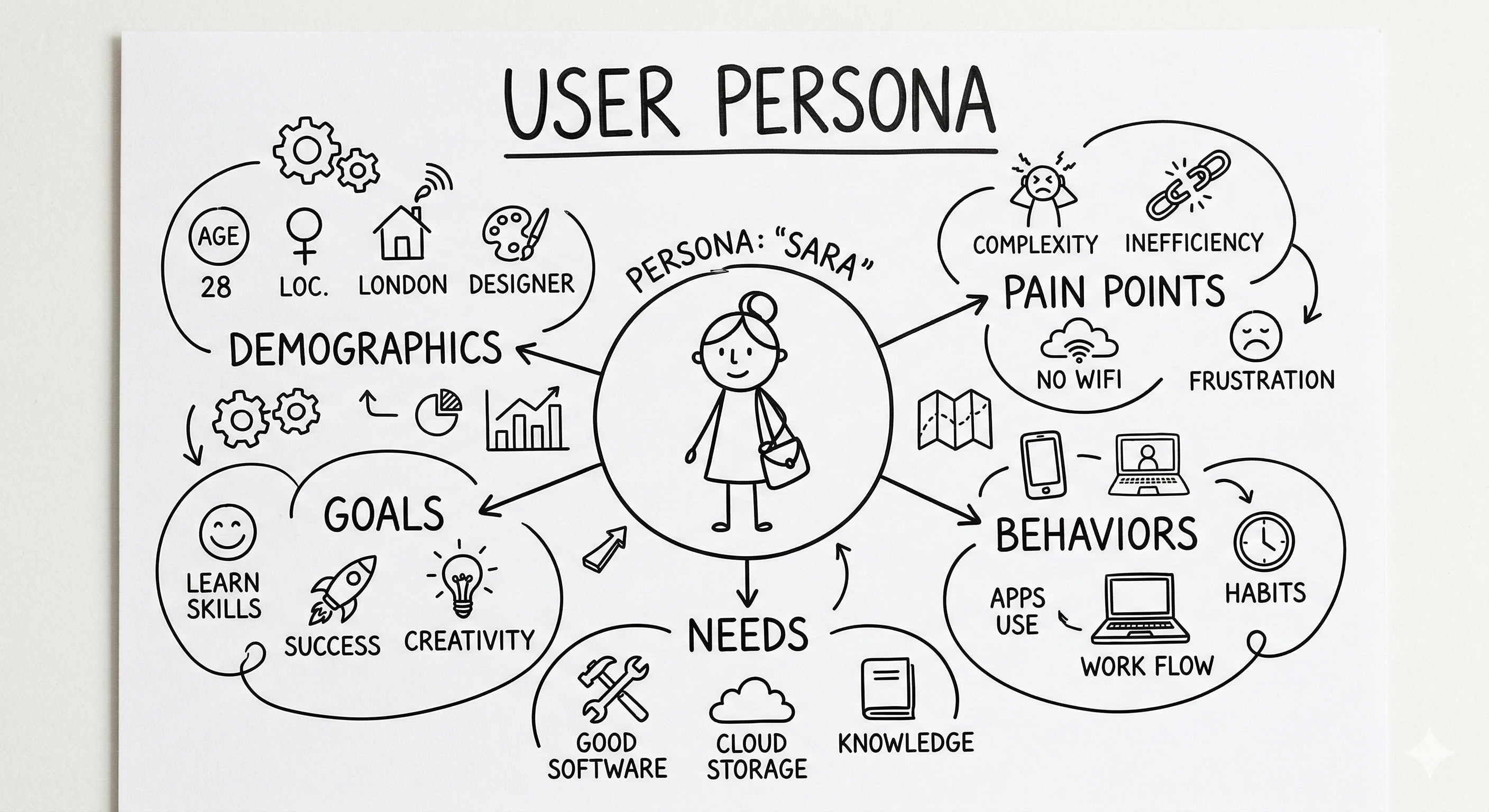
用户画像并非真实存在的某个人,而是基于大量真实用户数据的虚拟原型。
引用《用户体验要素》中的定义:它是根据目标群体的真实特征勾勒出的人物角色,是真实用户的综合原型。它清晰揭示用户目标,帮助我们把握关键需求,明确产品「应该做」和「不该做」的事项。同时也是一种「以用户为中心」辅助产品决策、设计、沟通的可视化交流工具。
一个合格且高标准的 Persona 应该由以下多个核心维度构成:
1. 基础属性
主要需记录用户的年龄、职业、坐标。这是画像的「骨架」,决定了用户的基本认知底色。
但更重要的是需要记录他的物理与软性环境。例如:他是在光线刺眼的户外操作手持设备,还是在安静的多屏交易室办公?或者他使用的是最先进的旗舰手机,还是受限于公司内网陈旧的浏览器?这些基础约束直接决定了设计的「技术下限」。
2. 行为特征
行为特征即为「他习惯用手机还是 PC?在处理高压任务时,他是焦虑地寻找快捷键,还是从容地浏览信息流?」
更需要观察的是他的操作惯性与频率。比如看用户的熟练度和容错性:
熟练度:他是每天处理数百笔订单的「权力用户」,还是每季度才登录一次的「偶然用户」?
容错性:在处理高压任务(如大额转账或紧急故障接管)时,他是倾向于快速盲操,还是每一步都需要反复确认?
3. 目标与动机
用户的目标与动机,不仅仅只是记录「他想买东西」。更重要的是:他的终极价值主张。例如他使用这个产品最想达成的终极目标是什么?如果再细分类,也可以分为功能目标、情感目标、动机分歧:
功能目标:记录用户完成任务的具体效率。
情感目标:比如在操作复杂的分析系统时,他是否需要一种「掌控感」和「专业感」?
动机分歧:为什么他选择你的产品而不是 Excel 或竞品?那个关键的「推力」是什么?
4. 痛点与障碍
在分析用户的痛点时,我们需要注重什么是他完成工作最大的阻碍?因为这代表着探究他的认知负担与恐惧。比如:哪些环节让他感到挫败?哪些专业术语超出了他的理解边界?关键识别出这些障碍,才是设计创新的真正切入点。
二、如何构建用户画像
如果应用在实际工作中,构建画像的方法论有很多种,甚至也有很多方法论复合使用,但是整体的构建过程通常分为定性挖掘、定量验证、原型刻画与场景模拟四个阶段。
结合我过去 8 年的经验,构建画像绝不是坐在办公室里空想,而是遵循以下路径:
1. 定性研究(挖掘深层动机)
这是最关键的一步。通过用户访谈或焦点小组,获取第一手资料。
经验谈:在做金融系统时,我会去观察分析师的桌面——他们开了多少个窗口?是否贴满了便利贴?这些细节比口头表达更真实。
2. 定量验证(剔除偶然误差)
通过问卷调查或后台埋点数据,验证定性研究中的结论是否具有普适性。
3. 聚类分析与原型刻画
将具有相似行为模式的用户归为一类。给每一类用户起一个名字,找一张头像。
4. 场景模拟
将画像放入具体的使用场景中。例如:「当自动驾驶车辆遇到紧急避障时,作为技术小白的用户 A 会产生什么情绪反应?」
三、现有主流分析模型
在实际工作中常用的模型有很多种,但是比较有代表性的分析模型如下:
1. JTBD 模型
如果说用户画像是在描述「用户是谁」,那么 JTBD 逻辑则是在挖掘「用户为什么要买你的产品」。在应用层面是指:不要只描述用户是谁,要描述他们「雇用」你的产品是为了完成什么任务。这能帮助我们发现那些隐藏在功能背后的底层诉求。
为了让这个模型落地,通常会使用 Job Stories 公式来描述:当 [场景/情况] 时,我想 [采取什么行动/动机],以便于 [预期的结果/价值]。
传统用户故事:「作为一个 [用户角色],我想要 [功能],以便 [价值]。」
(侧重于人)
JTBD 任务故事:「当 [早晨通勤路上] 时,我想要 [喝一杯奶昔],以便于 [打发无聊时间且直到中午都不会饿]。」
(侧重于场景和因果关系)
2. 共情地图模型
它是由 Dave Gray 提出的一种可视化工具,核心目的是帮助团队从「旁观者」转变为「当事人」,真正沉浸到用户的感官世界中,去体会他们的主观感受。
通常,我们会围绕一个大圆圈(代表用户)画出 6 个象限,分别填入以下内容:
① 听见——社交环境中用户在周围听到了什么?
朋友或家人怎么说?同行或上司的评价是什么?哪些媒体信息(播客、社交平台)在影响他?
② 看见——视觉环境中用户在日常生活中观察到了什么?
他的物理环境(家、办公室、地铁)是什么样的?他的竞争对手在用什么产品?市场上充斥着什么样的广告和选择?
③ 思考与感受——内心世界,这是最核心的部分,往往是用户不会公开表达的。
什么是他真正关心的?(金钱、地位、健康)他在深夜里焦虑什么?达成目标后他会感到怎样的满足?
④ 说与做——外部表现,是用户在公开场合的言行。
他会对别人如何描述他的需求?他的实际行动是什么?(可能说要省钱,实际上却买了高价咖啡)他的身体语言表现出什么(疲惫、兴奋、迟疑)?
⑤ 痛点——障碍。
他害怕什么?他在完成「任务」时遇到了哪些挫折?他的风险承受能力是多少?
⑥ 收益——渴望。
他对「成功」的定义是什么?什么是他梦寐以求的解决方案?达成目标能给他带来什么实际价值?
四、避坑指南:如何让画像「活」起来?
其实在实际工作中我发现设计师很容易落入「平均值陷阱」,就像是试图创造一个完美的、各方面都平均的用户。但真实的设计往往是为极端角色服务的。一个能满足「极度追求效率的专家」和「极度缺乏耐心的菜鸟」的系统,才具备真正的鲁棒性。
很多设计师做完画像后就把它束之高阁,这非常可惜。后续的追踪与更新也是我们设计师需要跟进的重要步骤之一:
拒绝「假大空」:别写那些对设计毫无帮助的信息(比如「喜欢打篮球」,除非你做的是运动 App)。
动态更新:市场在变,用户也在变。我在 Airwallex 期间,随着跨境电商环境的变化,我们会定期复盘画像的准确性。
从后台走向前台:正如我从后台设计转到直接对接客户,画像也要从「文档里」走向「白板上」。在评审会中,尝试代入画像角色去反驳不合理的逻辑。
Early in my career, I was caught in a kind of "functionalism" obsession: I believed the ultimate value of design lay in visual precision—rendering every pixel of a chart with perfect accuracy, or optimizing transaction flows for the shortest possible path. Efficiency, I thought, was the only truth.
But after years of working on large-scale data analytics systems and complex projects with strict safety and fault-tolerance requirements, my thinking underwent a fundamental shift. I came to realize that pure logical optimization, divorced from real human nature, often works against design. In a high-pressure operating environment, the shortest path may be the most dangerous one. In an information-overloaded decision context, the most precise chart may be the most confusing.
I came to understand deeply: if you cannot perceive the anxiety, desires, and cognitive limits behind the eyes on the other side of the screen, then all your design reasoning, aesthetic expression, and interaction innovation amount to nothing more than self-congratulatory noise. A designer's job is not to build perfect models in a vacuum—it's to find the most precise footing for a real, emotional, finite human being within a complex human-machine system.
This article is written to help myself and others develop a deeper understanding of user personas.
I. What Is a User Persona? (More Than Just Labeling)
A user persona is not a real person—it is a fictional archetype built from large amounts of real user data.
As defined in The Elements of User Experience: it is a character sketched from the genuine attributes of a target group—a composite prototype of real users. It clearly articulates user goals, helps us identify key needs, and defines what a product should and shouldn't do. It is also a visual communication tool that supports user-centered product decisions, design, and team alignment.
A well-built, high-quality persona should be composed of several core dimensions:
1. Basic Attributes
Start by recording the user's age, occupation, and location. This is the "skeleton" of the persona—it establishes the user's baseline cognitive context.
But more importantly, document their physical and soft environment. For example: are they operating a handheld device in glaring outdoor light, or working in a quiet multi-screen trading room? Are they using the latest flagship smartphone, or constrained by an outdated corporate intranet browser? These baseline constraints directly determine the design's "technical floor."
2. Behavioral Patterns
Behavioral patterns capture things like: "Do they prefer mobile or PC? When handling high-pressure tasks, do they anxiously hunt for shortcuts, or calmly browse through information?"
More importantly, observe their operational habits and frequency—specifically their proficiency and error tolerance:
Proficiency: Are they a "power user" processing hundreds of orders daily, or a "casual user" who logs in once a quarter?
Error Tolerance: When handling high-stakes tasks (such as large transfers or emergency system takeovers), do they tend to act quickly without looking, or do they need to confirm every single step?
3. Goals and Motivations
A user's goals and motivations aren't just "they want to buy something." What matters more is their ultimate value proposition—what is the deepest goal they want to achieve with this product? This can be broken down into functional goals, emotional goals, and motivational conflicts:
Functional Goals: The specific efficiency the user wants when completing tasks.
Emotional Goals: For example, when operating a complex analytics system, does the user need a sense of "control" and "professional competence"?
Motivational Conflict: Why did they choose your product over Excel or a competitor? What was the critical "push factor"?
4. Pain Points and Barriers
When analyzing pain points, focus on what is the biggest obstacle to completing their work—because this gets at their cognitive load and fears. Which steps leave them frustrated? Which technical terms exceed their comprehension? Identifying these barriers is where genuine design innovation begins.
II. How to Build a User Persona
In practice, there are many methodologies for building personas—and many projects use several in combination. But the overall process typically falls into four phases: qualitative discovery, quantitative validation, prototype development, and scenario simulation.
Drawing from my 8 years of experience, building personas is never about sitting in an office and guessing—it follows a concrete path:
1. Qualitative Research (Uncovering Deep Motivations)
This is the most critical step. Conduct user interviews or focus groups to gather first-hand material.
From experience: When working on financial systems, I would go observe the analyst's desk—how many windows did they have open? Were sticky notes covering their monitor? These details are more revealing than anything they'd say out loud.
2. Quantitative Validation (Eliminating Random Error)
Use surveys or backend analytics data to verify whether the findings from qualitative research hold broadly.
3. Cluster Analysis and Prototype Development
Group users with similar behavioral patterns together. Give each group a name and find a representative face.
4. Scenario Simulation
Place the persona in a specific use case. For example: "When an autonomous vehicle encounters an emergency obstacle, what emotional response would User A—a non-technical user—have?"
III. Leading Analytical Models
There are many models used in practice. The most representative ones are:
1. JTBD Model
If a persona describes "who the user is," then JTBD logic digs into "why the user would hire your product." In practice: don't just describe who your users are—describe what job they're "hiring" your product to do. This helps uncover the underlying motivations hidden beneath features.
To put this model into practice, the Job Stories formula is commonly used: When [situation/context], I want to [action/motivation], so that [expected outcome/value].
Traditional user story: "As a [user role], I want [feature], so that [value]."
(Focused on the person)
JTBD job story: "When [commuting in the morning], I want to [drink a milkshake], so that [I have something to do and won't be hungry until noon]."
(Focused on context and cause-and-effect)
2. Empathy Map Model
Developed by Dave Gray, this is a visual tool whose core purpose is to help teams shift from "bystanders" to "participants"—to genuinely immerse themselves in the user's sensory world and experience their subjective reality.
The map is typically drawn with a large circle (representing the user) surrounded by 6 quadrants:
① Hear——What is the user hearing in their social environment?
What do friends or family say? What do colleagues or managers think? What media (podcasts, social platforms) is influencing them?
② See——What does the user observe in their daily visual environment?
What does their physical environment look like (home, office, commute)? What products are their peers using? What ads and options surround them?
③ Think and Feel——The inner world—the most essential quadrant, often what users won't say aloud.
What do they truly care about? (Money, status, health) What keeps them up at night? What satisfaction would achieving their goal bring?
④ Say and Do——External behavior—what users say and do in public.
How do they describe their needs to others? What are their actual actions? (They might say they want to save money but buy expensive coffee.) What does their body language reveal (fatigue, excitement, hesitation)?
⑤ Pain——Obstacles.
What do they fear? What frustrations have they encountered completing their "job"? What is their risk tolerance?
⑥ Gain——Desires.
How do they define "success"? What solution do they dream of? What real value would achieving their goal bring?
IV. Pitfall Guide: How to Make Personas Come Alive
In practice, I've found designers easily fall into the "average user trap"—trying to create a perfectly balanced user who represents everyone. But real design often serves extreme archetypes. A system that works for both "the hyper-efficient expert" and "the impatient beginner" is what achieves true robustness.
Many designers shelve their personas once they're built—which is a real waste. Ongoing tracking and updates are essential steps that every designer should follow up on:
Reject vague generalities: Don't write information that's useless for design decisions (like "enjoys basketball"—unless you're building a sports app).
Keep it dynamic: Markets change, and so do users. During my time at Airwallex, as the cross-border e-commerce landscape shifted, we regularly revisited our personas to check their accuracy.
Bring it from the back room to the front stage: Just as I moved from back-end design to directly interfacing with clients, personas need to move from "documents" to "whiteboards." In design reviews, try stepping into the persona's shoes to challenge flawed logic.